


My first impression of My H-E-B was that it is designed for a very practical moment: I need groceries, but I do not want to walk every aisle, keep a paper list, or remember which offers I meant to use. It is a free shopping app from H-E-B that brings grocery pickup and delivery, coupons, the weekly ad, shopping lists, and related store tools into one place. That sounds straightforward, and in everyday use, that simplicity is its biggest advantage.
I would recommend it most strongly to people who already shop at H-E-B and want to make their regular trip more organized. It is also useful for anyone who prefers planning a basket at home before deciding whether to collect it or have it delivered. On the other hand, if you rarely visit H-E-B, need a broad comparison across several supermarket chains, or prefer choosing every item personally, the app may not change your routine very much.
What the app feels like when you begin
The app opens into a grocery-focused experience rather than trying to be a general shopping marketplace. That matters because the useful path is clear: find products, build a list or basket, check available savings, and choose a way to receive the order. I found that more comfortable than apps that mix groceries with unrelated departments and promotions.
My H-E-B is listed in the Shopping category, and H-E-B is the developer. It has a 4.7 average from around 43 thousand ratings, with more than a million installs, so it is clearly a familiar tool for a large number of shoppers. The age rating is Everyone, which fits the app’s ordinary household purpose. It is available at no charge, although the cost of groceries and any applicable order-related charges still depend on the choices made during shopping.
The store summary mentions pickup and delivery, coupons, the weekly ad, and shopping lists. In practice, I would treat those as connected parts of one routine rather than separate attractions. The weekly ad can influence what I plan to buy, coupons can affect which products make sense, and the list helps me avoid starting from zero on the next visit. The real benefit appears when I use those pieces together.
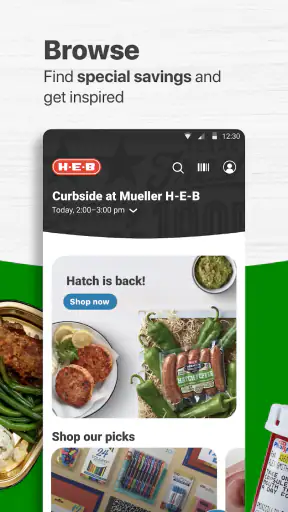
There is also a useful distinction between browsing and placing an order. I can use the app to look through products and savings without immediately committing to a pickup or delivery plan. That makes it suitable for planning a meal, checking whether a familiar item is available, or deciding whether a store trip is worth making. I would not assume that opening the app means I must finish checkout.
What I would prepare before installing
Before opening it for the first time, I would have my usual grocery needs in mind rather than trying to explore every screen. A short list of essentials is enough: breakfast items, a few vegetables, something for dinner, and one household product. This gives the search and list functions a real purpose and makes the first session easier to judge.
I would also decide whether my main goal is pickup, delivery, or planning for an in-person visit. Someone who wants delivery will naturally care about address and availability details, while someone who shops inside the store may get more value from lists, coupons, and the weekly ad. Starting with one clear goal prevents the app from feeling larger than it needs to be.
The current version is 2.83.0.56, and the minimum operating system is Android 7.0. That makes the app accessible on a wide range of Android devices, including older phones that are not running the newest software. Even so, I would keep the app updated when possible, because shopping tools depend on current product information and a stable account experience.
Setting up a useful first session
The first setup should be approached as a short orientation, not a long project. I would open the app, identify the store or service area that applies to me, and then move directly to a familiar product. Searching for something I buy regularly is more informative than browsing random departments. If the result is easy to recognize and add to a list or basket, I know the main workflow is working for me.
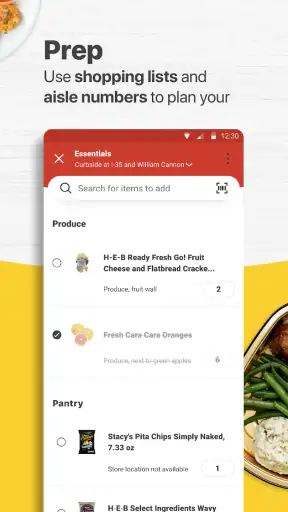
For a first-time user, the most important choice is whether to build a reusable shopping list or go straight toward an order. A list is the less demanding starting point. It lets me collect products while I remember them, without forcing me to make every decision at once. This is especially helpful when I am planning from a recipe or walking around the kitchen noticing what has run out.
I would create a list around a specific occasion instead of one enormous list containing everything I might buy someday. A “weekday dinners” list, for example, is easier to review than a mixed collection of groceries and household supplies. The non-obvious advantage is mental: a focused list helps me spot missing ingredients and remove impulse items before they become part of an order.
When I am ready to shop, I would use the search field for exact products first and browse departments second. Search is usually faster for repeat purchases, while browsing is better when I want ideas or need to compare nearby options. Switching between those approaches is more efficient than scrolling through an entire department every time I need one familiar item.
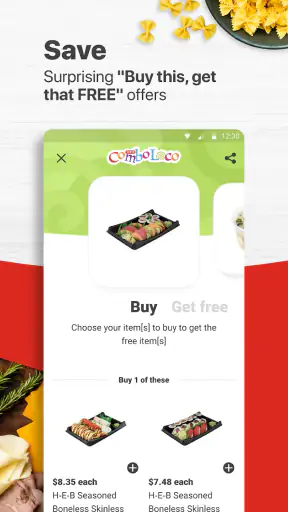
Coupons deserve attention before I finish the basket. I would not simply collect every offer I see. Instead, I would check whether the coupon matches something already on my list and whether the product size or variety is the one I actually want. A discount is not useful if it persuades me to replace a needed item with something I would not otherwise buy.
The weekly ad works best as a planning layer. I would look at it before making a meal plan, then search for the promoted products and add only the items that fit my household. This is a better workflow than opening the ad after the basket is complete, because late discovery can encourage unnecessary changes and make the final order harder to review.
The first meaningful success: completing a small grocery plan
My recommended first task is not a large weekly order. I would create a short list, find several familiar products, review available coupons, and then decide whether to turn that plan into pickup or delivery. The goal is to finish one useful grocery task without learning every feature at once.
A realistic example would be a busy weekday evening. I notice that I am short on milk, rice, fruit, and ingredients for a simple dinner. I open the app, search for the products I know, place them into a focused list or basket, and check the weekly ad before finalizing. If pickup is convenient, I can avoid walking through the store after work. If delivery suits the situation better, I can use the same prepared basket rather than rebuilding it elsewhere.
That workflow also shows why the app can be more valuable than a basic notes app. A notes app can remember “rice” and “fruit,” but it cannot connect those reminders to H-E-B products, coupons, or an order method. The trade-off is that My H-E-B is much more useful for H-E-B shopping and less useful as a neutral list that works across every supermarket.
For a household with several people, I would use the list as a checkpoint before ordering. I can review whether the basket covers breakfast, meals, snacks, and household basics instead of relying on memory at checkout. This is one of the app’s quiet strengths: it can reduce the number of decisions made under time pressure, provided I take a moment to organize the list first.
I would also avoid treating the first order as a test of speed alone. The meaningful success is accuracy and confidence: I found the products, understood the savings, selected the service that suited me, and knew what I was buying. A rushed order that needs corrections later is less helpful than a slightly slower first session that teaches me a repeatable routine.
Where new users may hesitate
The most common confusion is likely to come from the difference between a shopping list and an order basket. A list is a planning tool; a basket is a purchase in progress. I would keep those purposes separate. If I am only collecting ideas for later, I would use the list. If I have checked the products and am ready to arrange pickup or delivery, I would move into the ordering flow.
Another point that deserves care is product choice. Grocery names can look similar while differing in size, flavor, variety, or pack format. I would open the product details and check the description before adding an item, especially for ingredients used in a specific recipe. This small habit prevents the classic problem of receiving a technically correct product that is not the one I intended.
Coupons can also create uncertainty if I expect every visible offer to apply automatically to every basket. I would review the offer’s wording and make sure the selected product matches it. The practical lesson is simple: treat coupons as conditions to verify, not as a general reduction applied to the whole order.
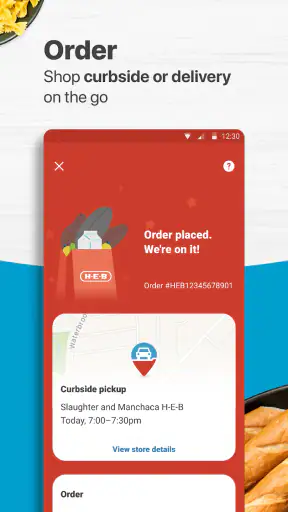
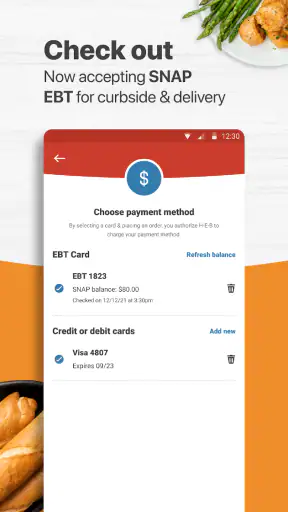
Pickup and delivery should not be viewed as identical alternatives. Pickup can be a good fit when I am already passing near the store and want to save time inside it. Delivery is more convenient when leaving home is difficult, but convenience does not remove the need to review the basket and service details carefully. I would choose based on my schedule and the order’s purpose rather than always selecting the same option.
Availability is another reason to review the final basket. Grocery shopping changes quickly, and an item that appeared while I was planning may not be the best choice by the time I am ready to complete the order. I would keep one or two acceptable substitutes in mind for essential ingredients. That is particularly important for a meal plan where one missing item can affect the whole dinner.
The app is not a perfect replacement for walking through the store. Browsing in person can reveal products I did not know about, and selecting produce personally may matter to shoppers who want to judge every item. My H-E-B is strongest when the priority is efficiency, repeat purchases, and planned shopping. It is less compelling when discovery and hands-on selection are the main reasons I shop.
Small habits that make the app more useful
I would build lists around routines rather than departments. A list for packed lunches or quick dinners is easier to reuse than a list divided only into produce, dairy, and pantry items. This approach turns the app into a planning aid, not merely a digital version of a piece of paper.
I would also check savings before final review, not only at the beginning. When I first plan a basket, I may not yet know which products I will keep. Reviewing coupons and the weekly ad after the list has taken shape lets me make deliberate substitutions instead of allowing promotions to dictate the whole shop.
For repeat orders, I would still scan the basket manually. Familiar shopping is where mistakes become easy to miss because I assume everything is unchanged. A quick review of quantities, varieties, and household essentials is more reliable than trusting memory or repeating a previous pattern without thinking.
Finally, I would use a small first order or list to learn the app’s rhythm before depending on it for a major occasion. If I am preparing for guests, traveling, or stocking up for a full week, I would give myself time to verify each item. The app can reduce effort, but it cannot decide whether a particular brand, size, or ingredient is right for my household.
Who should use it and who may prefer another option
My H-E-B is a strong match for regular H-E-B customers who want one place for grocery planning, savings, and fulfillment. Families can use it to coordinate recurring needs, busy professionals can prepare a basket before commuting home, and anyone trying to reduce unplanned purchases may appreciate building a list away from the aisles.
It is also a sensible choice for shoppers who already know what they buy. The more familiar my grocery routine is, the more time the app can save, because I can search for repeat products and organize a basket without browsing every shelf. The weekly ad and coupons add value when they support a plan I already have.
I would hesitate to recommend it as the main tool for someone who shops at many different chains and wants a single cross-store comparison. A retailer-specific app naturally works best inside that retailer’s ecosystem. A general list app may be better for someone who wants to record products without tying the list to one store, while visiting the store directly may suit a shopper who enjoys comparing brands in person.
I would also choose another approach if my shopping needs are highly spontaneous. The app can help me plan, but a planned digital basket is not the same as discovering what looks good on the day. Likewise, people who are uncomfortable checking product details or reviewing coupon conditions may find the convenience less valuable than expected.
One reason the app feels approachable is its broad age rating and modest technical requirement. It is intended for general household use rather than a specialist audience, and Android users with version 7.0 or later can install it. Still, ease of access should not be confused with automatic simplicity: the best results come from taking a few seconds to separate lists, savings, and orders into their proper roles.
My final take after using the full workflow
I see My H-E-B as a practical companion for a specific shopping habit: plan at home, check the available savings, and choose whether to collect the groceries or have them brought to me. It does not try to replace every kind of grocery trip, and that is fine. Its value comes from making a familiar H-E-B routine more deliberate and less dependent on memory.
The strongest experience begins with a small goal. I would install it, search for a few products I already buy, create a focused list, check the weekly ad and relevant coupons, then review the basket before choosing pickup or delivery. That path gives a first-time user a clear success without requiring a full tour of the app.
My main caution is to stay involved in the decisions. Product variations, coupon conditions, and the difference between planning and ordering all deserve a quick check. If I do that, the app saves more than time; it helps me shop with a clearer plan. If I want a store-neutral list, broad price comparison, or the experience of selecting everything myself, another method may be a better fit.
For existing H-E-B shoppers, I think the free price makes it worth trying, especially if grocery pickup or delivery would remove friction from a busy week. The app is not a universal grocery solution, but it is focused, accessible, and useful when its tools are combined thoughtfully. My recommendation is to start with one realistic shopping task rather than a large order, learn the workflow, and then decide whether it deserves a permanent place in your routine.


